
Operate terminals
Everything store staff need to take payments on the RX5000 and solve everyday issues.
Terminal menu and last transaction
What is where in the terminal menu, and how to check the last transaction before you charge a customer again.
Contactless tips
What to do when a card doesn't read.
Accessibility mode
Voice guidance, high contrast and headsets, so every customer can pay independently.
Security checks and cleaning
Protect customers' PINs, check terminals for tampering and clean them safely.
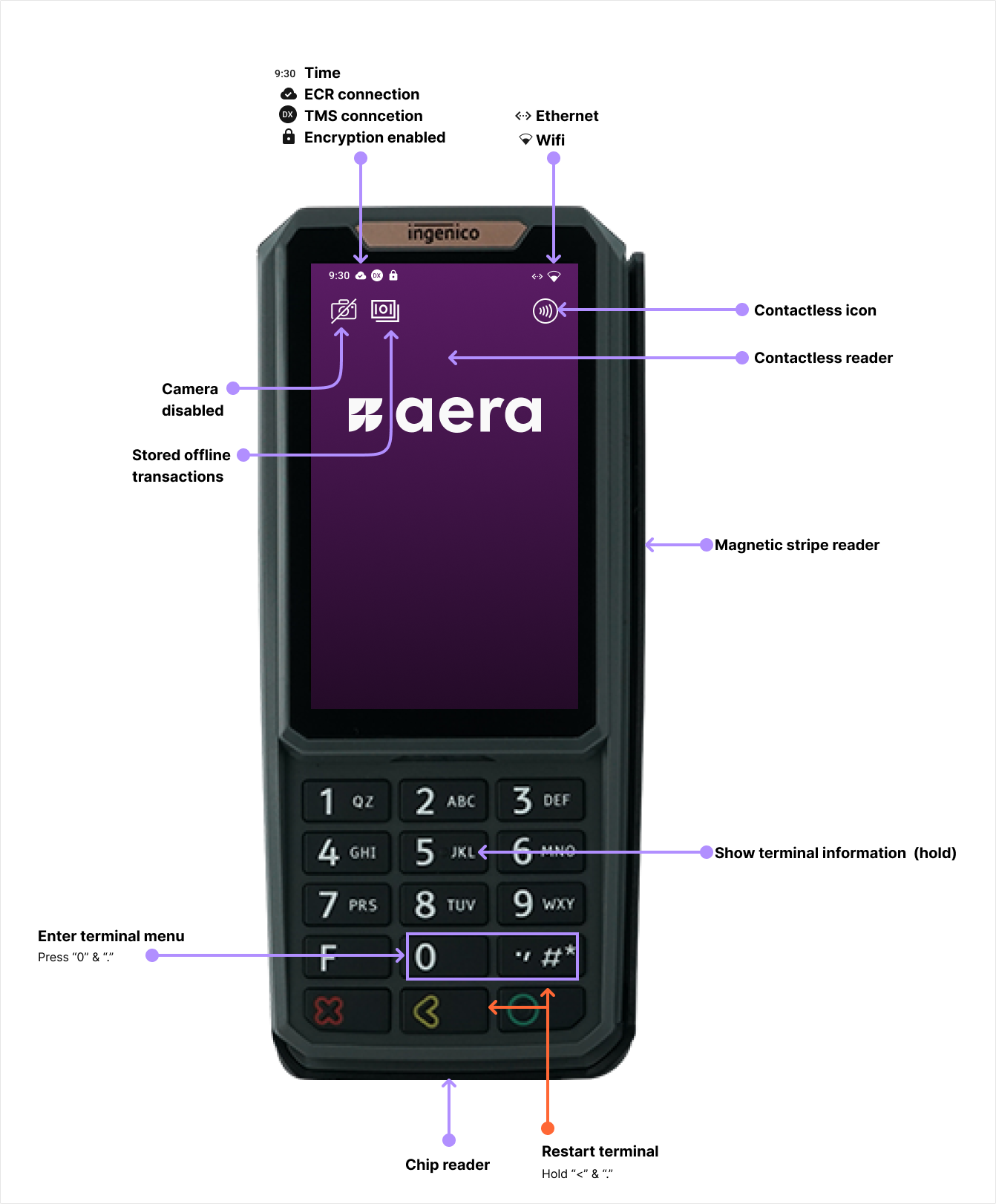
Buttons, readers and status icons are described under Terminal basics (RX5000) below.
When something goes wrong
- Card doesn't read? Ask the customer to try again, holding the card close to the front of the terminal. Occasional misreads are normal.
- Not sure if a payment went through? Check the last transaction before you charge the customer again.
- Still a problem? Open the terminal menu and select Terminal information (terminal ID, serial number and software versions). Contact support with this information and a detailed description of the error. See Get support.
- Terminal broken? Aera or your field service company replaces it. Technicians follow Replace a terminal.
Terminal basics (RX5000)
Buttons and readers
| What | Where / how |
|---|---|
| Contactless reader | Front of the screen. Customers tap here |
| Chip reader | Bottom of the terminal |
| Magnetic stripe reader | Right side |
| Open the terminal menu | Press 0 and . |
| Show terminal information | Open the menu, then select Terminal information |
| Turn on accessibility mode | Press and hold 5 on the idle screen, or tap the accessibility icon. See Accessibility mode |
| Restart the terminal | Press and hold < and . |
Status icons
| Icon | Meaning |
|---|---|
| Time | Current time |
| ECR connection | Connected to the ECR |
| TMS connection | Connected to terminal management (TMS) |
| Lock | Encryption enabled |
| Ethernet / Wi-Fi | Network in use |
| Camera disabled | The camera is turned off |
| Stored offline transactions | Payments stored on the terminal, waiting to be sent |
| Contactless icon | Contactless symbol on the screen |
Updated 11 days ago
Did this page help you?