
Standalone (no integration)
Manage your Payments directly on the terminal
Stand-Alone Operations
Aera Mobile supports stand-alone payment operations directly on the terminal, without requiring integration with an external Point of Sale (POS) or Electronic Cash Register (ECR) system.
The merchant can enter transaction amounts, accept payments, manage transactions, print receipts, and perform reconciliation activities directly from the terminal.
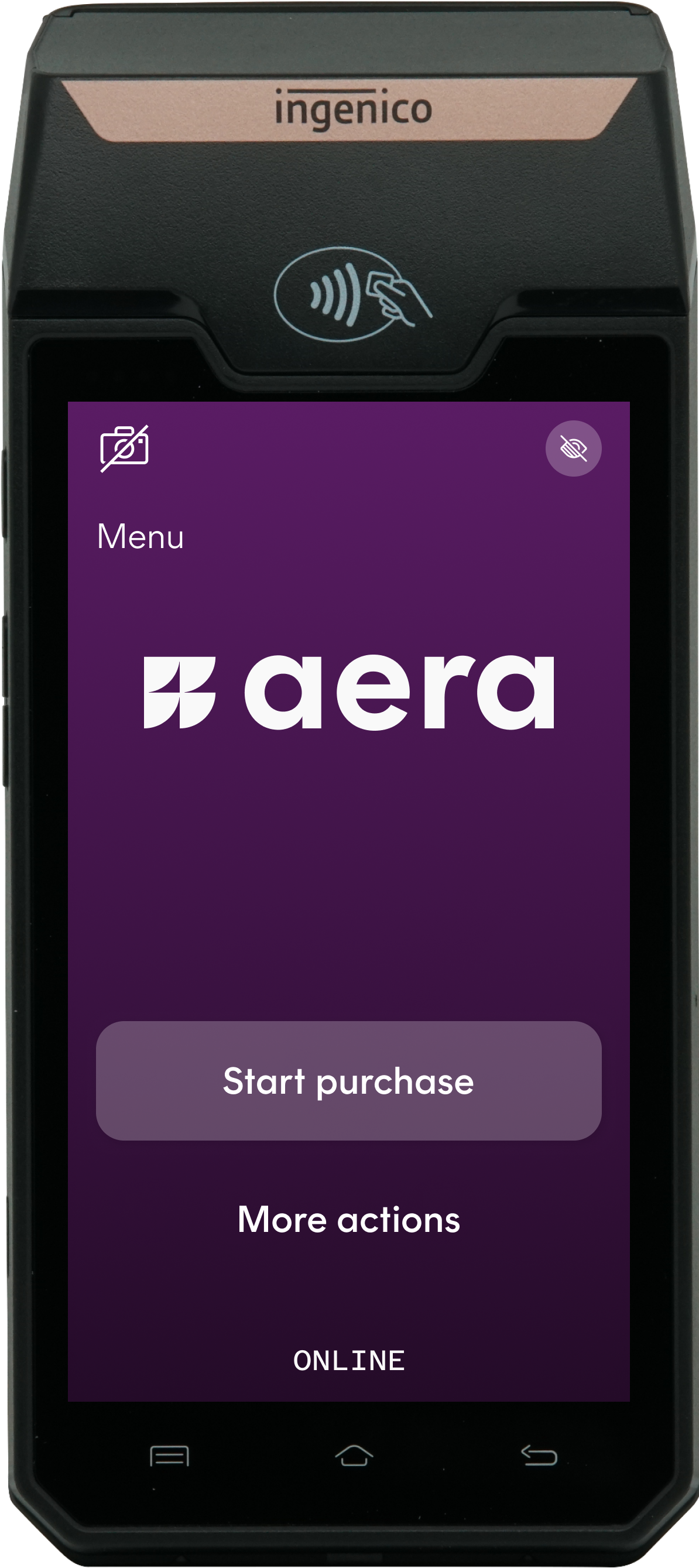
Note: Available functionality may depend on the terminal model, merchant configuration, payment provider, and acquirer setup.
Available Functions
The stand-alone terminal supports the following merchant operations without requiring a connected POS system.
💳 Payment Operations
Perform day-to-day payment transactions directly on the terminal.
- Accept payments
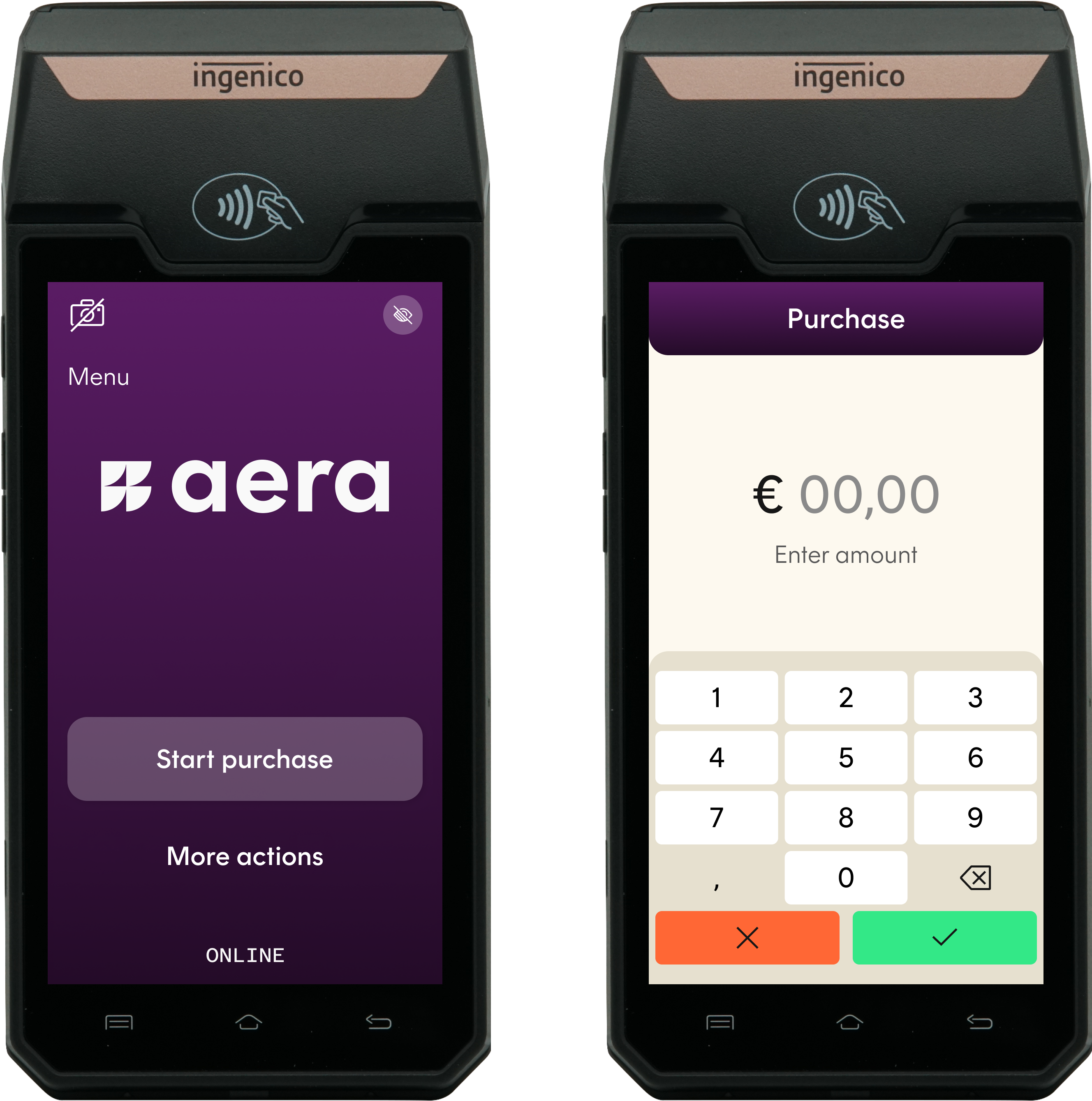
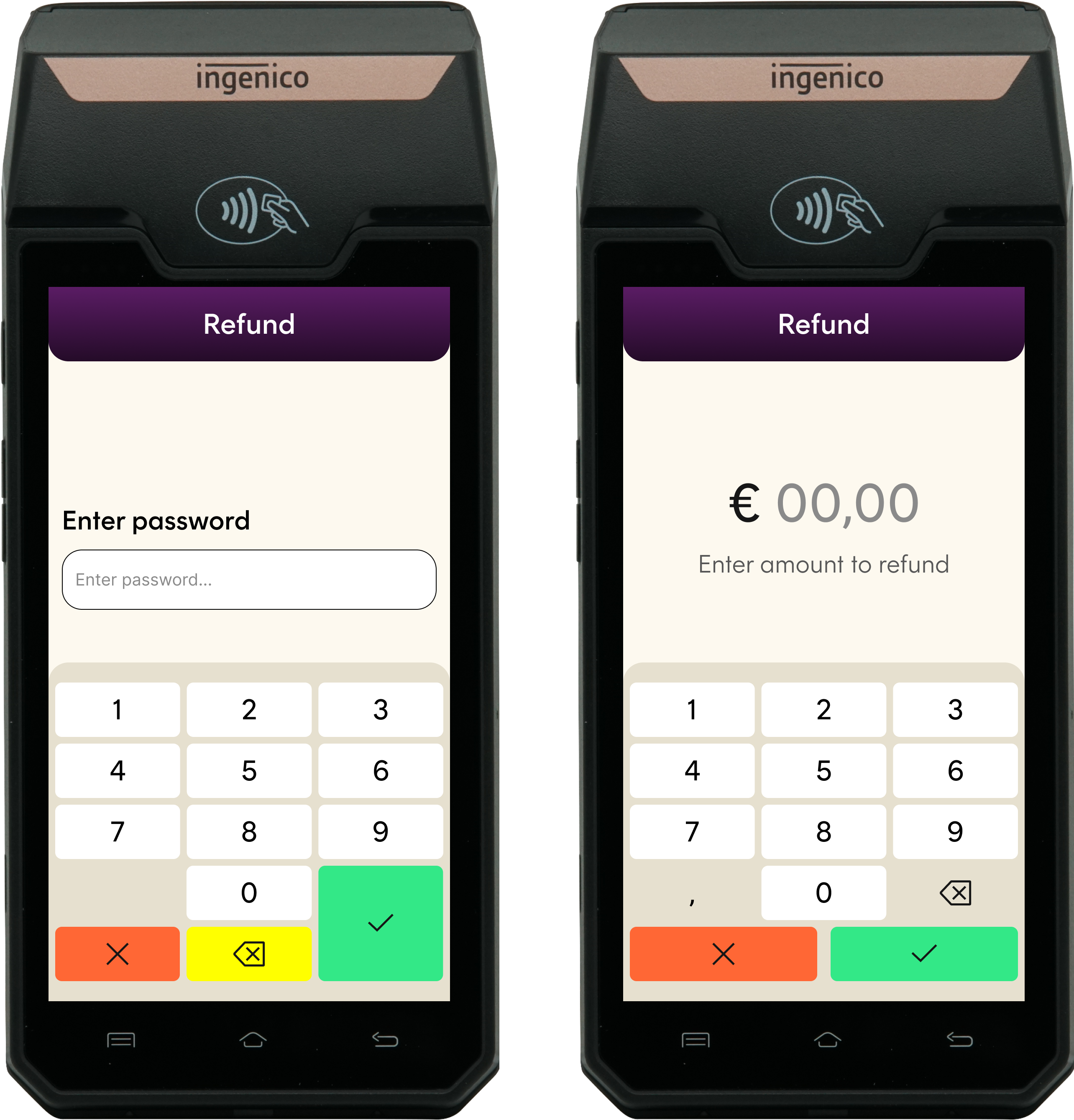
- Process refunds
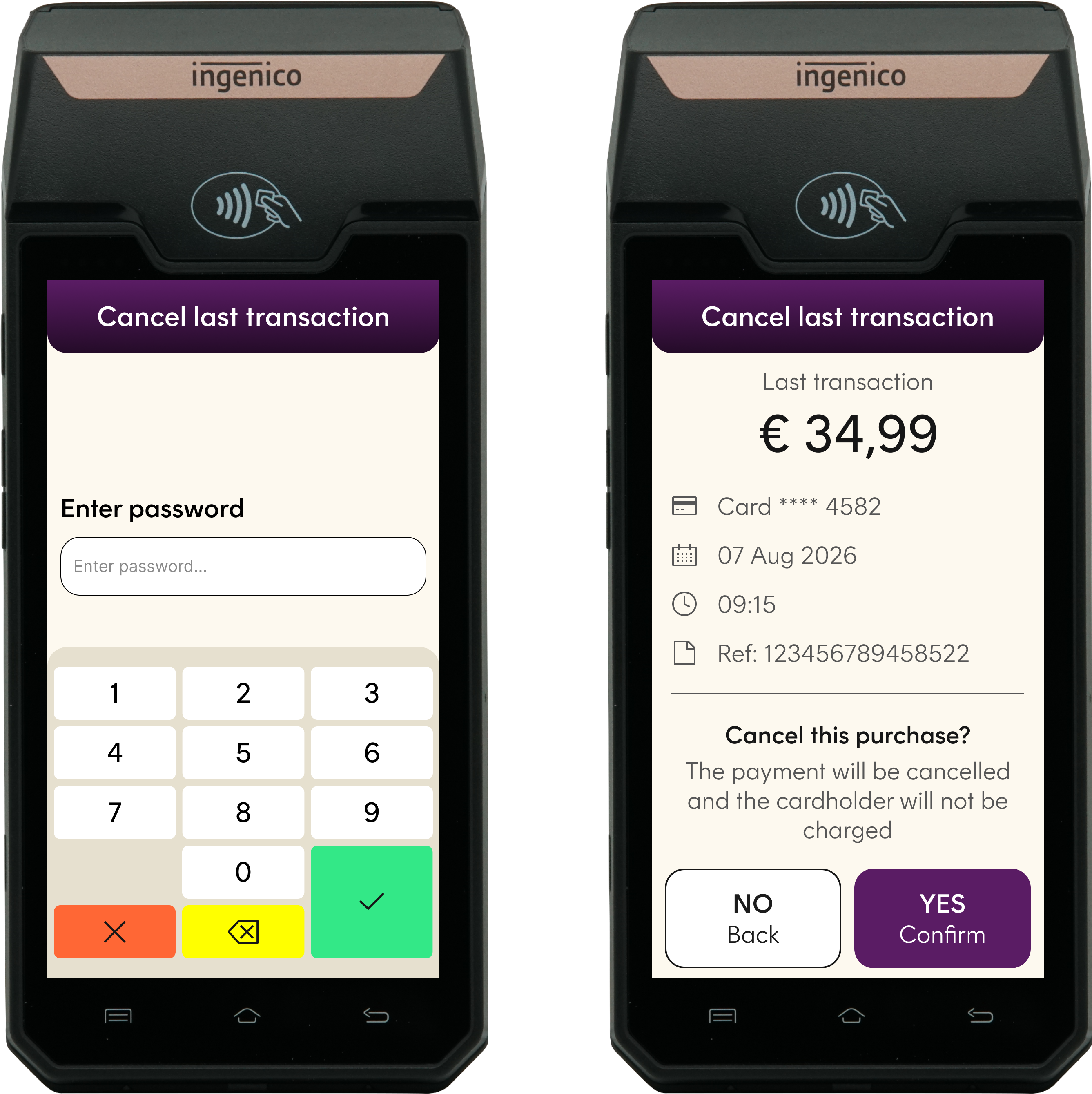
- Reverse the last transaction
📋 Transaction Management
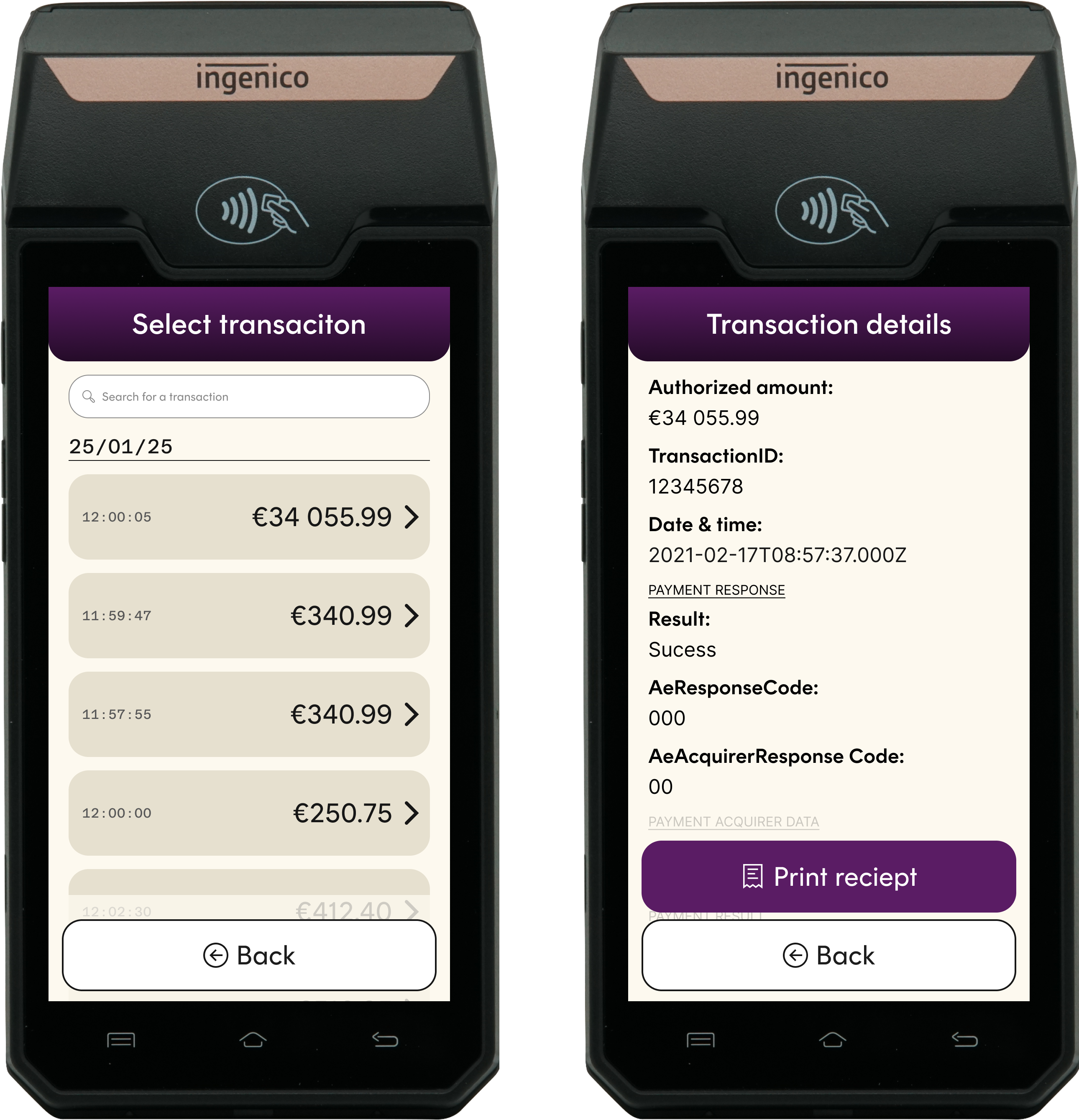
Access information about recently processed transactions.
- View last transaction details
🧾 Receipt Management
Manage customer and merchant receipts.
- Print receipt
- Reprint receipt
📊 Reconciliation & Settlement
Perform end-of-day operational procedures and reporting.
- End of Day (EOD) / Close Batch
- Print Reconciliation Report
⚡ Quick Overview
| Function | Description |
|---|---|
| Payment | Accept a card payment |
| Refund | Return funds to a customer |
| Reversal | Reverse the last transaction |
| Last Transaction | View details of the most recent transaction |
| Print Receipt | Generate a transaction receipt |
| Reprint Receipt | Reprint a previously generated receipt |
| End of Day | Close and reconcile the current batch |
| Reconciliation Report | Print transaction summary and totals |
Accept Payments
Payment
Initiate a card-present payment directly from the terminal.
The merchant enters the transaction amount on the terminal before presenting the terminal to the customer for payment.
Typical flow
- Select Payment.
- Enter the transaction amount.
- Confirm the amount.
- Ask the customer to present their card or payment device.
- Wait for the transaction result.
- Print a receipt if required.
The terminal displays whether the payment has been approved, declined, or could not be completed.
Refund
Issue a refund directly from the terminal without using an external POS or ECR system.
The merchant enters the amount to be refunded and follows the instructions presented on the terminal.
Typical flow
- Select Refund.
- Enter password
- Enter the refund amount.
- Confirm the amount.
- Follow the instructions displayed on the terminal.
- Wait for the transaction result.
- Print a receipt if required.
Important: Refund availability and processing requirements may depend on the merchant configuration and acquirer.
Reversal of the Last Transaction
Reverse the most recent eligible transaction processed by the terminal.
This function is intended for situations where the last transaction must be cancelled or reversed.
Typical flow
- Select Reversal.
- Review the transaction information displayed.
- Confirm the reversal.
- Wait for the reversal result.
- Print a receipt if required.
Important: Only the last eligible transaction can be reversed. Availability may depend on the transaction type, transaction status, and acquirer requirements.
Manage Transactions
Last Transaction
View information about the most recent transaction processed by the terminal.
Depending on the terminal configuration, the available information may include:
- Transaction type
- Transaction amount
- Transaction date and time
- Transaction status
- Transaction reference
- Masked card information
- Card scheme
The displayed transaction information can be used to verify the result of the most recent transaction or to determine whether further action is required.
Note: The Last Transaction function displays transaction information. It does not initiate a new payment, refund, or reversal.
Manage Receipts
Print Receipt
Print a receipt when a transaction has been completed.
Depending on the transaction result and terminal configuration, the terminal may offer one or more of the following:
- Customer receipt
- Merchant receipt
- No receipt
Receipt printing requires a terminal with an available and correctly configured printer.
Reprint Receipt
Reprint the receipt for the most recent eligible transaction stored on the terminal.
Typical flow
- Select Reprint Receipt.
- Review the transaction information displayed.
- Select the required receipt type.
- Confirm printing.
Note: Reprinting is limited to transactions available on the terminal. The exact retention and availability may depend on the terminal configuration.
Perform Reconciliation
End of Day
Use End of Day to close the current reconciliation period.
When the operation is completed, a new reconciliation period is established for subsequent transactions.
Typical flow
- Select End of Day.
- Confirm that the current period should be closed.
- Wait for the operation to complete.
- Review or print the resulting report.
Important: End of Day affects the merchant's reconciliation period and should only be performed by authorized personnel.
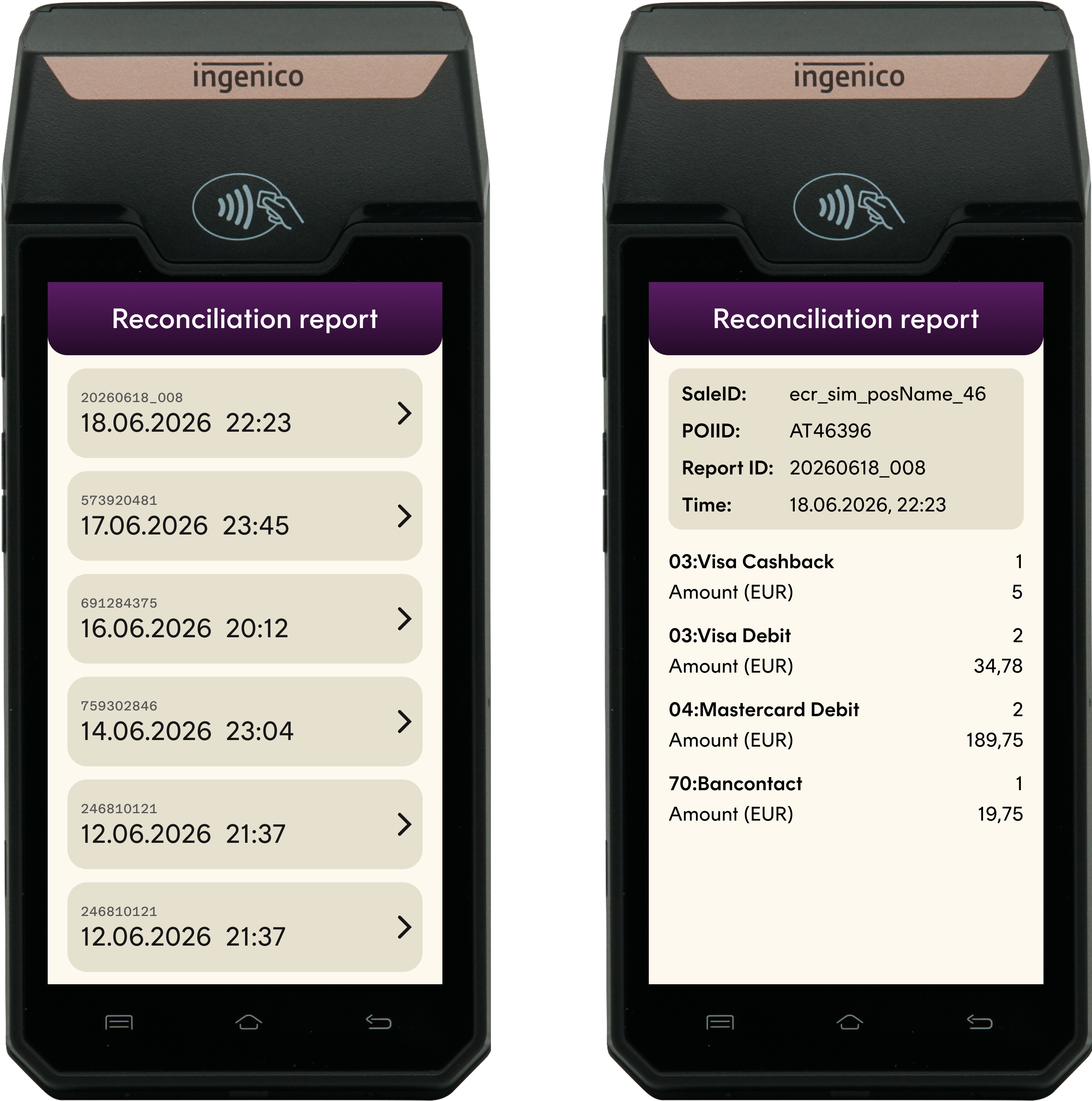
Print Reconciliation Report
Print a reconciliation report for the relevant closed reconciliation period.
The report provides an overview of transactions included in the period. Depending on the merchant and acquirer configuration, the report may contain:
- Total transaction amount
- Number of transactions
- Payments
- Refunds
- Reversals
- Totals by card type
- Reconciliation reference
Note: The content and level of detail in the report may vary depending on the payment provider, acquirer, and merchant configuration.
Operational Considerations
User Authorization
Access to sensitive functions may be restricted by password, user role, or terminal configuration.
Functions that should normally be limited to authorized merchant personnel include:
- Refund
- Reversal
- End of Day
Connectivity
Some operations require connectivity between the terminal and the payment platform or acquirer.
If an operation cannot be completed, follow the instructions displayed on the terminal. Do not repeat a transaction unless the result of the previous attempt has been verified.
Receipt Availability
Receipt functionality depends on the terminal type:
- Terminals with an integrated printer can print physical receipts.
- Reprinting is limited to transactions retained and available on the terminal.
Terminology
| Term | Description |
|---|---|
| Payment | A card-present transaction initiated by entering an amount directly on the terminal. |
| Refund | A transaction that returns funds to the customer. |
| Reversal | Cancellation or reversal of the last eligible transaction. |
| Last Transaction | Information about the most recent transaction processed by the terminal. |
| Receipt | A printed or otherwise provided record of a transaction. |
| End of Day | Closing of the current reconciliation period. |
| Reconciliation Report | A report containing transaction totals for a reconciliation period. |
| POS | Point of Sale system. |
| ECR | Electronic Cash Register. |
Updated 13 days ago